Amazon Seller Chrome Extension: What to Install First
TL;DR: An Amazon seller Chrome extension adds data to the Amazon pages you already browse, such as profit estimates, sales rank or a listing score. Pick one by what it needs from you. Page readers need no login and can be free. Tools that pull your own sales or fees ask for Seller Central authorization, which you renew every year, and paid sourcing tools run about $100 to $240 a year.
Table of Contents
- What does an Amazon seller Chrome extension actually do?
- Three kinds of extensions, sorted by what they need from you
- What does a paid sourcing extension cost per year?
- Which permissions should make you stop before clicking Add to Chrome?
- What our free listing check grades, and why
- Where do extensions stop being useful?
- A one-week setup for a small seller team
- Where to start
- Frequently Asked Questions
Most lists of extensions for sellers rank tools by popularity. That helps a shopper more than an operator. If you run a brand doing real volume, the better question is what each tool can see, what it costs over a year and which job it takes off your team. This page answers those three points with public pricing, Google's and Amazon's own documentation, and what we learned building our own listing checker at SellerPlex.
What does an Amazon seller Chrome extension actually do?
It reads the Amazon page in your browser tab and adds information on top of it. A sourcing tool shows estimated fees and margin next to the price. A research tool shows rank history and sales estimates. A listing tool grades the product page against what Amazon rewards.
The extension does its work where you are already looking. You skip copying an ASIN into a separate app, waiting for a report and switching back. For a buyer scanning hundreds of product pages a day for wholesale or online arbitrage, that saved step is the whole value.
Some extensions only read the public page. Others connect to your seller account to add your real fees, your stock or your sales. That split decides almost everything else: price, risk and who on your team should install it.
Three kinds of extensions, sorted by what they need from you
Page readers with no account access
These read the public product page and nothing else. Our own free Amazon Chrome extension works this way. It grades the listing you open inside your browser and sends nothing to us unless you choose to unlock the fixes. Page readers are the lowest-risk install because they never touch Seller Central.
Tools you authorize through Seller Central
Profit calculators and restriction checkers often need your account data to show your fees and whether you can sell an item. RevSeller is a clear example. Its FAQ says it follows the policies of Amazon's Selling Partner API (SP-API), which require sellers to authorize access before it can make calls for the account, according to RevSeller's own site.
Amazon explains how that authorization works in its Selling Partner API documentation. The seller grants the app permission through Login with Amazon. Public apps must be reauthorized every year, and you manage them on the Manage Your Apps page in Seller Central. That page is also where you revoke a tool your team stopped using.
Suites that add an extension to a bigger platform
Research suites bundle an extension with keyword tools, product databases and dashboards. The extension is the entry point to a subscription. If you already pay for the suite, use its extension. Buying a suite only for the extension is usually the expensive route to a number a lighter tool already shows.
What does a paid sourcing extension cost per year?
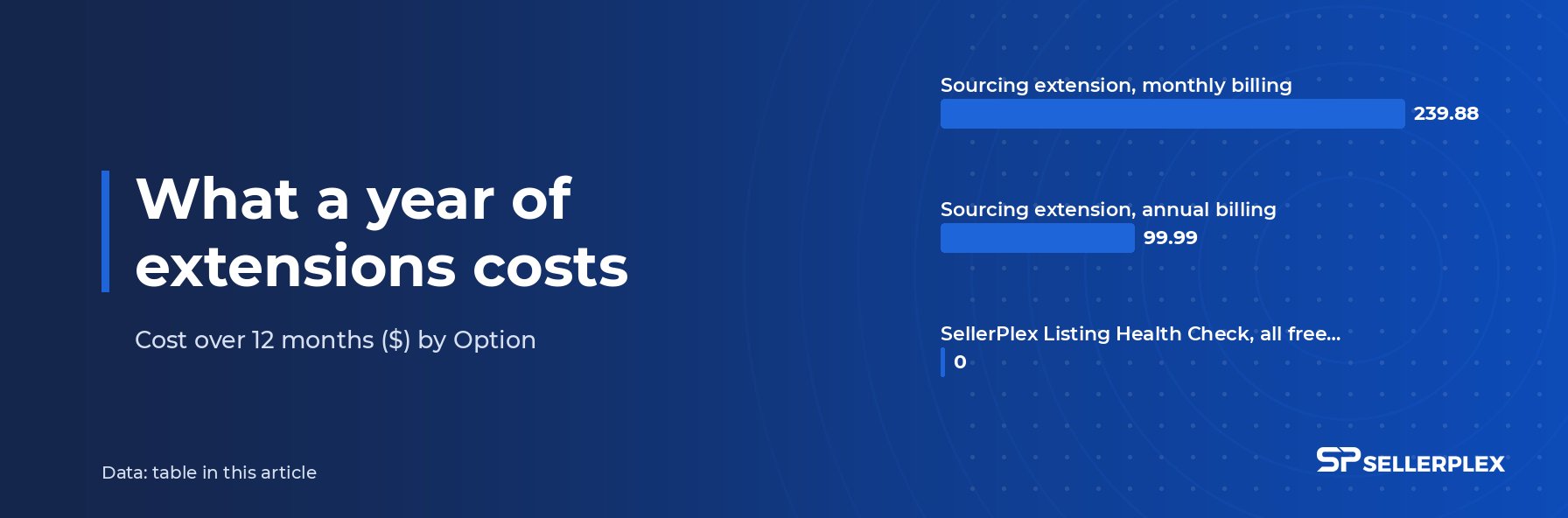
A dedicated sourcing extension costs from about $100 to $240 a year, depending on how you pay. RevSeller lists a 30-day free trial, $99.99 a year on annual billing and $19.99 a month on monthly billing, on its pricing section. Monthly billing for a full year comes to $239.88.
What a year of extensions costs
| Option | Cost over 12 months ($) |
|---|---|
| Sourcing extension, monthly billing | 239.88 |
| Sourcing extension, annual billing | 99.99 |
| SellerPlex Listing Health Check, all free checks | 0 |
The gap is $139.89 a seat. A three-person sourcing team on monthly billing pays $419.67 more a year than on annual. That is a small number for one brand and a real one for an agency or a team with several buyers. Start the trial, confirm the tool fits your buying process within 30 days, then switch to annual.
Free tools are not free of cost to your team. Each one you add is one more place where a number can disagree with Seller Central. RevSeller itself tells users to check its estimates against Amazon's calculator or the fee estimates on the manage inventory page before making product decisions. Treat every extension number as a quick filter, then confirm the shortlist inside Seller Central.
Which permissions should make you stop before clicking Add to Chrome?
Stop when an extension asks to read and change data on every website. Chrome shows a warning when you install an extension, and the scope of that warning tells you what the tool can touch. Google's permission warning guidelines state that extensions are required to fulfill a single purpose and should request relevant permissions only. A listing tool that wants all your sites is asking for more than its job needs.
The same guide notes that some warnings hide behind broader ones. The "tabs" warning does not show when an extension also requests access to all URLs. So a short warning list is not proof of a narrow tool. Open the Chrome Web Store listing, read the privacy section and check what the developer declares it collects.
A quick check before your team installs anything
- Read the install warning. Amazon product pages only is a good sign for a page reader.
- Open the privacy disclosure on the Chrome Web Store listing.
- Check whether the tool wants Seller Central authorization, and whether it really needs it.
- Note who installed it and on which account, so it gets removed when that person leaves.
The last step matters most for teams. An app authorized by a freelancer keeps its access until someone revokes it on the Manage Your Apps page. The same care applies to logins across brands, which our guide on running several Amazon accounts without compliance trouble covers in more detail.
What our free listing check grades, and why
SellerPlex built the Amazon Listing Health Check as a free page reader. It scores any Amazon product page out of 100, with each check in green, amber or red. According to its Chrome Web Store listing, it works on 22 Amazon marketplaces, from amazon.com and amazon.co.uk to amazon.co.jp and amazon.sg.
| Check | What turns it amber or red |
|---|---|
| Title | Too short or too long, or the product type missing from the first 80 characters |
| Bullet points | Fewer than five used, or too thin to sell |
| Images and video | Empty image slots, or no product video |
| A+ content | No Standard or Premium A+, or no Brand Story |
| Rating and reviews | A weak star rating, or too few ratings behind it |
| Buy Box | Add to Cart missing, or the listing unavailable |
| Variations | Sizes, colours or packs split across separate listings |
| Coupon and rank | No coupon or deal running; the row also shows Best Sellers Rank in its own category |
| Brand Store | The byline under the title not linked to your store |
Every check is free and needs no account. If you add your email, the extension shows the fix for each amber and red row and puts your listing next to the top 3 in its category. You also get the weekly account checks our account managers run on every client account.
Use it on your own listings first, then on the three competitors you lose the most clicks to. The comparison usually shows one or two gaps worth fixing this week, often a missing video or an empty image slot. Our Amazon product listing optimization guide explains how to fix each of those once you know where they are.
Turn Amber Listing Scores Into Fixed Listings
Bring the listings that score lowest, and a SellerPlex strategist will walk you through what to fix first and who should do it.
Talk to a StrategistWhere do extensions stop being useful?
Extensions stop helping when the problem is the work itself. A tool can tell you a listing has no A+ content, an item is restricted or a margin looks thin. It cannot write the A+ module, file the ungating request or renegotiate with the supplier.
A common pattern is a team that already owns several tools while the open issues sit in a spreadsheet nobody has time to clear. Adding another extension does not change that. What changes it is a person with a weekly routine for account health, listings and stock.
That routine is what our Amazon account management team runs. They watch the account weekly, fix what the checks surface and report what changed. If you are still choosing research tools, our comparison of product research tools helps you pick the right one for sourcing decisions.
A one-week setup for a small seller team
Day one, list every extension each person has installed and every app on the Manage Your Apps page. Remove what nobody used in the last month.
Day two, pick one sourcing or research tool for the whole team. Run the free trial on real buying decisions instead of test ASINs.
Day three, run a listing check on your top 10 ASINs by revenue and write down every red row. Those 10 listings carry most of your sales, so they get fixed first.
Later in the week, assign each red row to a named person with a date. Check the same 10 listings again seven days later. The score should move, and if it does not, the problem is capacity and no extension will solve it.
Where to start
Install one page reader, run it on your best-selling listings and fix the red rows before you buy anything else. Add a paid sourcing extension only when someone on your team buys inventory every week.
If the checks keep finding the same gaps and nobody has time to close them, book a strategy call with SellerPlex and bring your lowest-scoring listings.
Frequently Asked Questions
Is it safe to use a Chrome extension on Amazon Seller Central?
It can be, if the extension asks only for what its job needs. Read the install warning and the privacy disclosure on the Chrome Web Store listing. Prefer tools that read public product pages, and authorize Seller Central access only for tools that must see your fees or stock. Review the Manage Your Apps page every quarter.
Do I need a paid Amazon seller Chrome extension?
Only if someone on your team buys inventory often. Sourcing tools pay for themselves through faster buying decisions. Listing checks and basic rank data are available for free. A brand that manufactures its own products usually gets more from fixing listings than from paying for a sourcing calculator nobody opens.
How accurate are fee and sales estimates in extensions?
They are estimates and should be treated as a first filter. RevSeller itself advises checking its numbers against Amazon's calculator or the fee estimates in Seller Central before making product decisions. Sales estimates are modelled from rank, so confirm demand with several weeks of rank history before placing a large order.
Does the SellerPlex Listing Health Check need my Amazon login?
No. It reads the Amazon product page you open and grades it in your browser. It has no access to Seller Central, passwords or payment details. It only sends anything when you choose to unlock the fixes, and then only your name, email, brand and the listing you were on.
Next step: Talk to a Strategist. Book a free strategy session with our Amazon and e-commerce specialists. No obligations, just actionable insights.