
Most Amazon sellers know they should run PPC ads. Far fewer know when to use Amazon PPC for maximum impact. Launch too early and you burn budget on a listing that can’t convert. Wait too long and competitors claim page-one real estate you’ll never take back organically. Understanding precisely when to use Amazon PPC is the difference between a profitable ad strategy and an expensive experiment.
Table of Contents
- What Is Amazon PPC and When Does It Apply?
- How Amazon PPC Timing Works
- Key Benefits of Timing Amazon PPC Correctly
- 7 Signals That Tell You When to Start PPC
- Step-by-Step: How to Decide If Now Is the Right Time
- Best Tools for PPC Timing Analysis
- Common Timing Mistakes Sellers Make
- Advanced Strategies: Timing PPC for Maximum ROI
- Frequently Asked Questions
- Conclusion
In this guide, you’ll find the 7 signals that confirm you’re ready to advertise, a step-by-step readiness framework, and exactly when to scale — and when to pause.
What Is Amazon PPC and When Does It Apply?
Amazon PPC (Pay-Per-Click) is Amazon’s self-serve advertising platform that places your products in front of high-intent shoppers. Specifically, when to use Amazon PPC is not just a technical question — it’s a strategic one. The timing of your launch determines whether you generate ROI or simply accumulate wasted spend.
Understanding when to use Amazon PPC requires evaluating three variables simultaneously: your listing’s conversion readiness, the competitive intensity of your category, and your available budget. For most sellers, Amazon PPC applies in four core scenarios: new product launches, organic rank acceleration, competitive defense, and seasonal peak preparation.
In 2026, sellers who treat when to use Amazon PPC as a deliberate strategic decision consistently outperform those who treat ads as a default “on” switch. The marketplace has matured — and so must your approach to advertising timing.
How Amazon PPC Timing Works
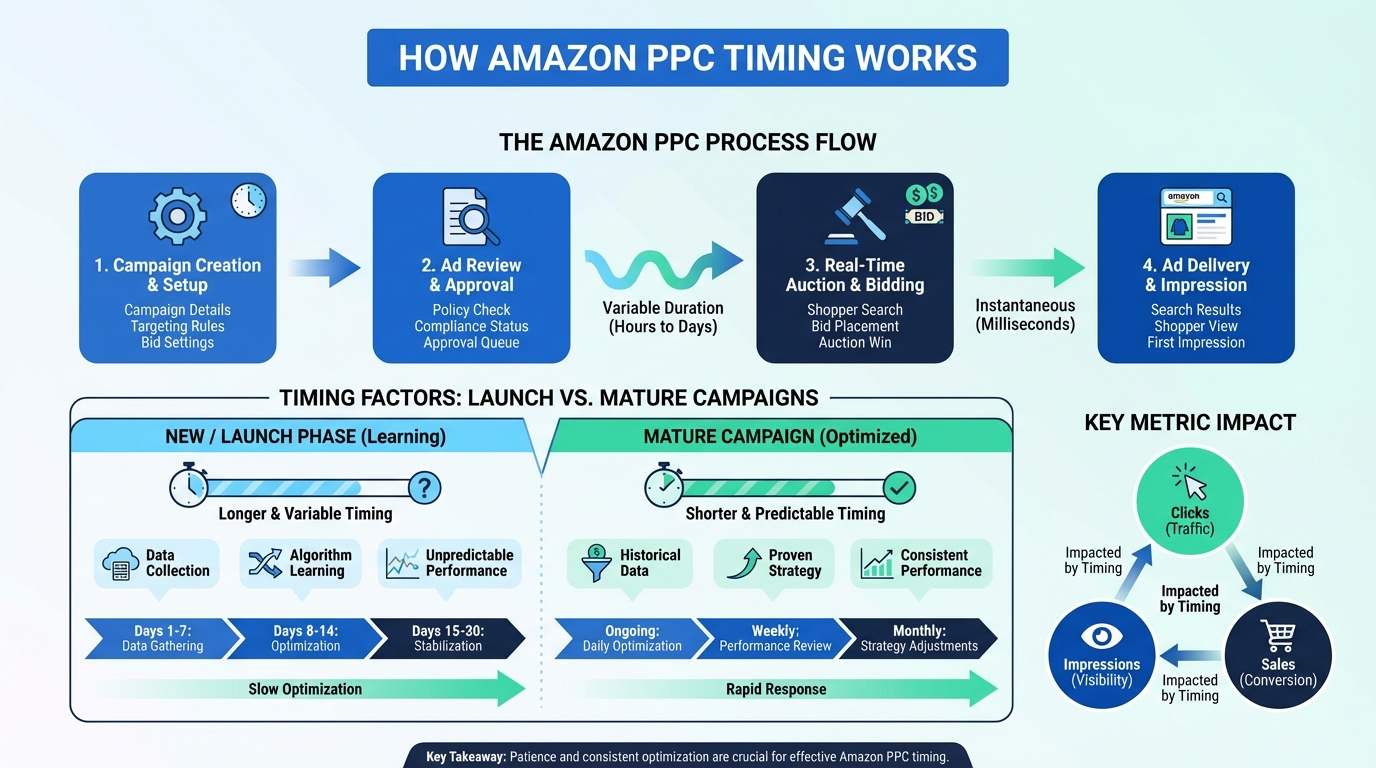
Understanding the mechanics of PPC timing helps you make smarter decisions before committing budget.
Amazon’s ad algorithm rewards conversion history. An ad that consistently converts earns lower CPCs and better placement over time. Consequently, the quality of your listing at launch directly determines your long-term ad efficiency. A weak listing at launch means higher CPCs from day one — and that cost disadvantage can persist for months.
Here’s how the timing cycle unfolds:
- Pre-launch — Optimize listing (images, copy, reviews). Ads launched on weak listings pay 30-50% higher CPCs than ads on optimized listings.
- Launch phase (weeks 1-4) — Run automatic targeting to discover which keywords and ASINs your product converts on. Accept higher ACoS during this phase — it’s data collection, not profit generation.
- Optimization phase (weeks 5-12) — Move converting keywords to manual exact-match campaigns. Add negative keywords aggressively.
- Scaling phase (month 3+) — Increase bids on winners and expand to Sponsored Brands and Sponsored Display. At this stage, when to use Amazon PPC shifts from “should I?” to “how much?”
- Maintenance phase — Run defensive branded campaigns and seasonal bid adjustments year-round to protect organic traffic.
The key insight: when to use Amazon PPC is not a binary yes/no decision. It’s a phased escalation based on what your listing data and campaign metrics tell you.
Key Benefits of Timing Amazon PPC Correctly
Getting the timing right on when to use Amazon PPC delivers compounding advantages that misaligned launches cannot achieve:
- Lower launch CPCs — A listing with 50+ reviews and strong conversion history wins ad auctions at 30-50% lower CPC than a weak listing.
- Faster organic rank gains — Ad-driven sales velocity during the right window accelerates organic rank improvement faster than organic traffic alone.
- More profitable data collection — Launching when conversion rate is high means your search term data reflects real buyers, not accidental clickers.
- Sustainable ACoS — Campaigns launched at the right time consistently achieve target ACoS 2-3x faster than campaigns launched prematurely.
- Lower lifetime ad spend — A well-timed launch requires less total spend to reach the same organic rank outcome, because each dollar works harder from day one.
7 Signals That Tell You When to Start PPC
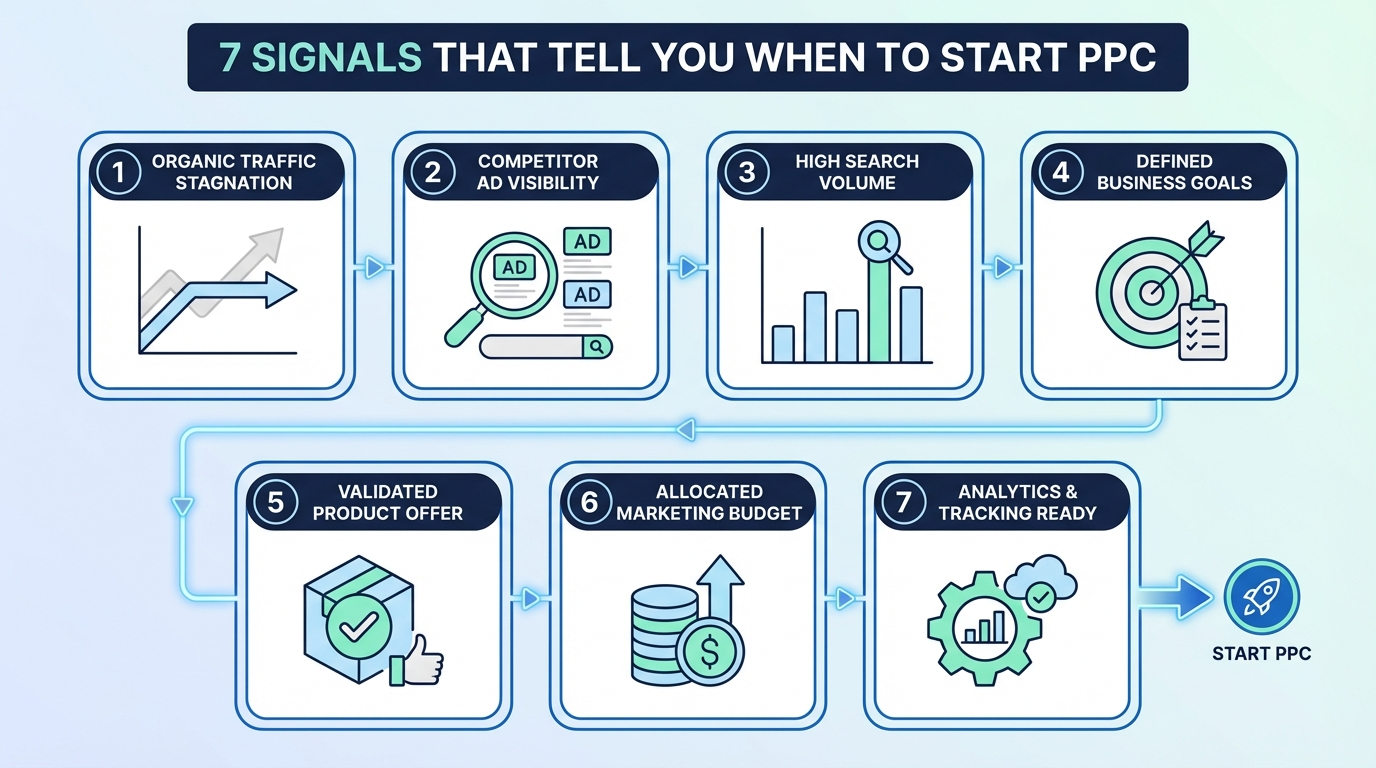
The most common question about when to use Amazon PPC is simply: “Am I ready?” Here are the 7 signals that tell you the answer.
Listing and Budget Readiness Signals
- Signal 1: 15+ reviews averaging 4.0 or higher — Ads drive traffic to your listing. Without social proof, that traffic bounces without buying. Specifically, conversion rates on listings with fewer than 15 reviews run 40-60% lower than on listings with 50+ reviews. The math on when to use Amazon PPC doesn’t work without baseline conversion performance.
- Signal 2: Your main image wins the click — Open an incognito browser, search your primary keyword, and ask honestly: would you click your product over the top results? If not, fix the image before spending on ads.
- Signal 3: You know your break-even ACoS — If you cannot state your target ACoS clearly, you cannot run profitable ads. Calculate it first: profit margin % = your maximum sustainable ACoS. For full benchmark data, see our Amazon PPC cost guide.
- Signal 4: You have a minimum 14-day budget — A $15-20/day budget for at least 14 days is required to gather statistically meaningful data. Anything less produces noise, not insight.
Market and Timing Signals
- Signal 5: Your organic rank is stuck below position 30 — When organic traffic is minimal, PPC is the only way to generate sales velocity that pushes rankings up. Consequently, new products almost always need ads to break out of page-three obscurity.
- Signal 6: A competitor is running ads on your ASIN — Check your product page for sponsored product ads from competitors. If they’re present, they’re actively stealing your conversion rate. Defending your own listing is a when to use Amazon PPC scenario that applies immediately, not eventually.
- Signal 7: A seasonal peak is 3-4 weeks away — Q4, Prime Day, and category-specific shopping seasons drive 2-5x normal traffic. Launching campaigns 3-4 weeks before a peak gives the algorithm time to optimize before volume spikes.
Not Sure If Your Listing Is PPC-Ready?
Our team will audit your listings and campaigns and identify exactly where to start — and what to fix first.
Step-by-Step: How to Decide If Now Is the Right Time
Follow this decision framework to determine definitively when to use Amazon PPC for your specific situation.
Step 1: Score Your Listing Readiness
First, rate your listing on 5 factors (0-2 points each):
- Main image quality: 0 (weak) / 1 (good) / 2 (exceptional)
- Review count and rating: 0 (fewer than 15) / 1 (15-49) / 2 (50+, 4.0+)
- Title and bullets: 0 (generic) / 1 (keyword-optimized) / 2 (benefit-driven + keywords)
- A+ Content: 0 (none) / 1 (basic) / 2 (full brand story)
- Price competitiveness: 0 (highest in category) / 1 (mid-range) / 2 (competitive or better)
If your score is 7-10, you’re ready to launch PPC now. If your score is 5-6, optimize your listing first, then launch within 2 weeks. A score below 5 means PPC will drain budget without ROI — fix the listing before spending.
Step 2: Calculate Your Minimum Launch Budget
Next, confirm you have adequate capital for the discovery phase. Specifically, the minimum effective when to use Amazon PPC launch budget is $300-400 spread over 14-21 days. Below this threshold, you won’t collect enough data to optimize any keyword or placement effectively.
Step 3: Assess Your Organic Rank Trend
Then, check your organic rank trend for your top 3 keywords over the past 30 days. If you’re ranking below position 30 with no upward movement, PPC is the fastest path to generating the sales velocity that improves rank. In contrast, if you’re trending organically toward page 1 already, you may be able to delay PPC and preserve budget for the scaling phase.
Step 4: Evaluate Competitive Ad Pressure
Furthermore, look at your category’s top 10 listings and check how many are running Sponsored Products ads on their own product pages. If 7 or more are running ads, delaying PPC risks losing visibility as competitor placements crowd your listing page. Additionally, check whether competitor ads appear on your product page specifically — if they do, that’s a clear signal to start immediately.
Step 5: Define Your Success Metric Before Launch
Finally, decide what “working” looks like before you spend a dollar. Is it ACoS below 25%? Organic keyword ranking reaching page 1? Sales rank improvement of 10,000 positions? Defining the success metric in advance prevents shutting down campaigns that are actually performing — just not on the metric you assumed you were optimizing.
Best Tools for PPC Timing Analysis
Several tools help you make data-driven decisions about when to use Amazon PPC rather than relying on guesswork.
- Amazon Seller Central (free) — The Brand Analytics section shows organic keyword ranking trends and click-through rate data. This is your primary signal for whether organic momentum justifies delaying PPC or whether ads are essential now.
- Helium 10 (from $39/month) — Keyword Tracker shows your organic rank over time. Additionally, Cerebro reveals competitor keyword strategies, helping you identify whether competitors are outspending you on PPC for keywords that matter to your listing.
- Jungle Scout (from $49/month) — PPC Analyzer estimates competition levels and average CPCs for your target keywords before you commit budget. This helps you validate whether your break-even ACoS is realistic for your category.
- SellerPlex Amazon PPC management — For sellers who want an expert assessment of when to use Amazon PPC without spending months learning the system. Our team evaluates listing readiness, budget requirements, and competitive dynamics to provide a data-driven launch recommendation.
Common Timing Mistakes Sellers Make
Mistake 1: Launching PPC With Fewer Than 15 Reviews
This is the most expensive timing mistake in Amazon advertising. Specifically, ads drive traffic to a listing that can’t convert at a rate that justifies the click cost. Conversion rates on listings with 0-5 reviews average 2-3% — versus 10-15% on listings with 50+ reviews. Therefore, wait until you have at least 15 reviews before activating campaigns.
Mistake 2: Pausing Ads When Organic Sales Improve
When organic rank improves and sales increase, many sellers pause PPC thinking they no longer need it. In reality, turning off ads during an organic upswing risks losing the sales velocity that’s driving the ranking improvement. Instead, reduce bids gradually over 2-4 weeks rather than pausing completely.
Mistake 3: Starting PPC With Low Inventory
Launching PPC campaigns when you have fewer than 30 days of inventory is a risk that destroys momentum. Consequently, if PPC works as intended, you’ll sell out — then lose your organic rank gains during the stockout. Plan to have 60+ days of inventory before committing to a full PPC launch.
Mistake 4: Using PPC to Rescue a Failing Listing
Amazon PPC works best when launched from a position of listing strength. Similarly, a declining listing with poor reviews, outdated images, and low conversion rates will not be “saved” by ad spend — it will just burn through budget faster. Fix the listing fundamentals first, then use PPC to accelerate the recovery.
Advanced Strategies: Timing PPC for Maximum ROI
Build a Seasonal Budget Calendar
First, map your category’s seasonal demand patterns using historical sales data and Amazon’s own Brand Analytics. For most categories, the highest-ROI windows for when to use Amazon PPC are Prime Day preparation (launch 4 weeks prior), Back to School (July-August), and Q4 pre-holiday (October through early November). Increasing budgets 3-4 weeks before peaks gives the algorithm time to learn before volume spikes.
Layer External Traffic With PPC Launch Timing
Furthermore, combine PPC launch timing with social media or email campaigns that drive external traffic simultaneously. Amazon’s algorithm weights conversion rate, not just units sold. Consequently, a burst of high-converting external traffic during your PPC launch week accelerates organic rank faster than PPC alone — because it signals to Amazon that shoppers actively seek your product.
Match Bid Strategy to Product Life Cycle
The right bid strategy changes at each stage of your product’s life. During launch, use dynamic bids up-and-down to maximize exposure and learning. During the optimization phase, switch to dynamic bids down-only to protect margins while cutting inefficient spend. During scaling, add placement bid adjustments of +50-100% for top-of-search positions. As a result, matching bid strategy to life cycle stage prevents the most common source of budget waste in Amazon advertising. For a detailed breakdown of cost benchmarks by category, see our Amazon PPC cost guide.
Frequently Asked Questions
When should I start Amazon PPC for a new product?
Start Amazon PPC when your listing has at least 15 reviews averaging 4.0 or higher, your main image is competitive with top search results, and you have a budget of $300-400 for a 14-21 day discovery phase. Launching before these conditions are met typically results in ACoS of 60-100%+ and minimal organic rank improvement, making the spend impossible to justify.
Is Amazon PPC worth it for products that already rank on page 1?
Yes, for two reasons. First, branded keyword campaigns that protect your top-of-search placement cost only $0.10-0.30 per click — the highest-ROI advertising you can run. Second, Sponsored Brands and Display ads expand your total visible real estate even when your Sponsored Products are already on page 1, increasing your share of total page impressions.
When should I pause Amazon PPC campaigns?
Pause PPC campaigns when ACoS consistently exceeds your profit margin for 30+ days of optimization with no improvement trend. Additionally, pause during planned stockout periods to avoid paying for clicks you cannot fulfill. Never pause campaigns based solely on high ACoS during the first 14 days — that is the discovery period, not the profitability period.
How long does it take to know if Amazon PPC is working?
Expect 14-21 days of data before drawing any conclusions about specific keywords or placements. For overall campaign profitability, the typical timeline is 60-90 days from launch. Sellers who optimize weekly typically see ACoS improve 20-35% from week 2 to week 8, based on SellerPlex campaign data across 100+ managed brands.
What is the worst time of year to start Amazon PPC?
Avoid launching brand-new campaigns in the final two weeks of November and early December, when CPCs spike 40-60% across most categories due to holiday competition. Starting during this window means you’ll pay peak prices for the data-collection phase that should happen at normal CPCs. Launch in October instead, so campaigns are optimized before the Q4 volume spike.
Should I run Amazon PPC for every product in my catalog?
Not necessarily. Prioritize PPC for products with profit margins above 25%, hero SKUs that anchor brand visibility, and products in categories where ad-driven sales velocity correlates strongly with organic rank improvement. For low-margin products, focus on exact-match keywords with proven conversion rates rather than broad discovery campaigns. See our guide to Amazon FBA optimization for how listing-level economics affect PPC ROI.
How do I know when it’s time to scale Amazon PPC spend?
Scale when a campaign consistently achieves your target ACoS for 14 or more consecutive days. Specifically, increase budget in 20-25% increments to test scalability — a campaign performing at 20% ACoS on $30/day may behave differently at $100/day. Additionally, only scale into campaigns where you have sufficient inventory to support the increased sales velocity without risking a stockout.
Conclusion
Knowing when to use Amazon PPC separates profitable advertisers from those who burn through budget without results. Ultimately, the right time is when your listing can convert the traffic you’re paying for, you have the budget to collect meaningful data, and you have a clear ACoS target to optimize toward.
Your action plan:
- Score your listing readiness (target 7-10 out of 10)
- Confirm you have a 14-21 day discovery budget of $15-20/day
- Identify your break-even ACoS before spending dollar one
- Launch automatic campaigns and let them run for 14 full days
- Build manual campaigns from your search term report winners
For sellers managing multiple SKUs and ready to systematize when to use Amazon PPC across their full catalog, see our complete Amazon PPC for small business playbook for the full campaign architecture.
Related: Amazon PPC Cost in 2026: What You’ll Actually Pay (With Real Data)
Ready to Grow Your Amazon Business?
Book a free strategy session with our Amazon and e-commerce specialists. No obligations, just actionable insights.

SellerPlex Editorial Team
Amazon & E-commerce Experts
The SellerPlex Editorial Team brings together Amazon operators, PPC strategists, and supply chain specialists with hands-on experience scaling 100+ FBA brands. Every article is grounded in real campaign data, operational experience, and a commitment to practical, ROI-driven advice.